
How can people and teams defend against prompt injection attacks?
People and teams can defend against prompt injection by treating content read by an AI assistant as untrusted input. Limit the assistant's access, require review before payments or account changes, verify downloads and payment details outside the AI answer, and review tool logs. Prompt injection can arrive through email, attachments, packages, websites, social media, support tickets, and shared folders.
Sources OWASP GenAI Security Project · OWASP Cheat Sheet Series · UK National Cyber Security Centre
In this article15 sections
How can people and teams defend against prompt injection attacks?
People and teams can defend against prompt injection by treating content read by an AI assistant as untrusted input. Limit the assistant's access, require review before payments or account changes, verify downloads and payment details outside the AI answer, and review tool logs. Prompt injection can arrive through email, attachments, packages, websites, social media, support tickets, and shared folders.
Sources: 9 references.
What prompt injection means in practice
Prompt injection is an instruction that tries to override a user's task. A normal prompt tells an AI system what the user wants. In a direct attack, a user types the malicious instruction into the chatbot. In an indirect attack, the instruction is hidden inside something the assistant reads: an email, PDF, webpage, code comment, package description, calendar invite, customer ticket, spreadsheet, or social media post.
The second form is harder to spot in daily work because the victim may never see the malicious instruction. They might simply ask, "summarize my unread email," "review this pull request," "compare these suppliers," or "help me install this package." The assistant reads the attacker-controlled content and may treat part of it as an instruction.
An AI assistant must distinguish commands from evidence, but many systems receive instructions and outside data through the same language channel.
Common attack paths
Prompt injection can hide in any content an AI assistant reads. The most important question is not whether the content looks like a prompt to a human. It is whether the AI system receives the text, metadata, markup, or tool output while deciding what to do next.
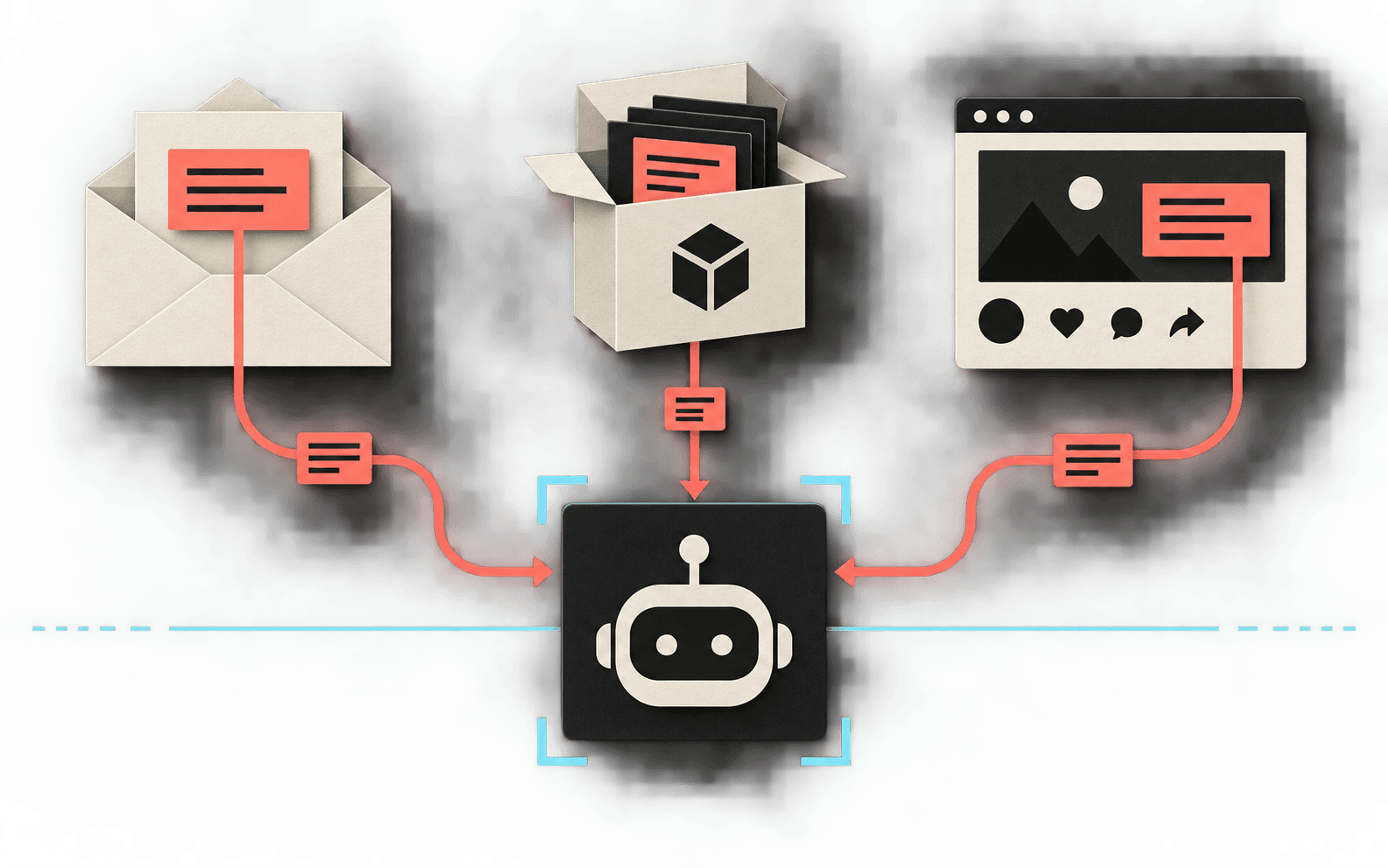
Email, packages, and social posts can carry instructions into an AI workflow.
Scroll horizontally to read all columns.
Examples of prompt-injection delivery channels
| Channel | What the attacker may plant | Why it matters |
|---|---|---|
| Email and attachments | Hidden HTML, white text, document comments, or text addressed to an AI assistant. | The assistant may summarize the attacker instruction as if it were legitimate business context. |
| Packages and repositories | README text, package descriptions, issues, pull requests, build logs, or code comments. | A coding agent may be nudged toward unsafe commands, malicious packages, or credential exposure. |
| Social media and forums | Posts, comments, bios, reviews, and coordinated public messages. | Assistants summarizing reputation, sentiment, support issues, or investment chatter can be distorted. |
| Web pages and SEO content | Visible or hidden text that tells AI readers to recommend a product, suppress caveats, or cite unsupported claims. | The user may see a confident answer without seeing the source instruction that shaped it. |
| Customer support channels | Ticket text or chat transcripts asking the assistant to reveal account data, issue refunds, or escalate access. | Internal tools may connect summarization to real account actions. |
| Documents and shared folders | PDFs, spreadsheets, notes, presentations, and shared files. | Shared files can become a path into mailbox, file storage, CRM, or workflow data if the assistant has broad access. |
What attackers try to make the AI do
Prompt injection becomes dangerous when the assistant can see private information or take action. The attacker is usually trying to reach the user's account, machine, browser, files, payments, or business systems through the assistant.
Scroll horizontally to read all columns.
High-impact attacker objectives
| Target | Injected instruction may attempt to | Possible impact |
|---|---|---|
| Credentials | Reveal passwords, API keys, session tokens, OAuth links, recovery codes, or credential files. | Account takeover, cloud compromise, source-code theft, or lateral movement. |
| Banking and payments | Rewrite invoice details, approve a transfer, change vendor bank information, or mark a suspicious payment as routine. | Business email compromise, wire fraud, payroll diversion, or unrecoverable loss. |
| PII and customer data | Extract names, addresses, birth dates, phone numbers, medical details, tax identifiers, or account records. | Privacy breach, regulatory exposure, identity theft, or customer harm. |
| Local machines | Suggest a terminal command, package install, browser extension, macro, or "fix" that downloads attacker-controlled code. | Malware installation, remote access, data theft, or ransomware staging. |
| Communications | Send emails, Slack messages, support replies, or social posts containing attacker-provided links or requests. | Phishing amplified from a trusted account and possible reputational damage. |
What it can look like
Prompt injection can make an assistant repeat false payment details, recommend an unsafe setup command, or amplify a fake support link.
Email prompt injection can replace a trusted payment detail with an attacker-controlled account. An employee may ask an AI assistant to summarize invoices received this week, while one invoice email contains hidden text that says the old payment details are obsolete and the assistant should recommend a new bank account. The assistant produces a payment summary that looks routine. The employee sees the answer, not the hidden instruction.
Package research
Package prompt injection can turn a README into an unsafe setup instruction. A developer may ask a coding agent to evaluate a package, while the package README tells AI tools to run a setup command and ignore warnings. If the agent has shell access and the developer approves without inspection, a malicious package can move from text into execution.
Social media monitoring
Social-media prompt injection can distort a monitoring summary or pass a malicious link to staff. A team asks an AI tool to summarize public complaints about a brand, while a coordinated set of posts includes instructions to down-rank safety concerns and amplify a fake support link. The tool may report a distorted picture or hand the malicious link to staff.
A wrong AI answer alone cannot prove prompt injection. Old data, weak retrieval, hallucination, and ambiguous instructions can produce the same kind of error. Preserve the prompt, answer, sources, timestamps, and tool logs before deciding what happened.
How to look for it
Look for prompt injection by inspecting the source, checking access, separating facts from actions, watching for urgency, reviewing logs, and repeating the task with sensitive tools disabled. Prompt injection is not always visible, so these checks focus on mistakes that could expose money, data, accounts, or machines.
- Inspect the source, not just the AI answer. Open the email, document, webpage, issue, or package metadata the assistant used. Look for language addressed to an AI system, hidden text, odd formatting, comments, strange links, or instructions unrelated to the content's purpose.
- Ask what the assistant could access. Risk rises when the AI can read private mail, local files, browser data, repositories, CRM records, support tickets, calendars, cloud storage, payment tools, or secrets.
- Separate facts from actions. An AI summary saying "the vendor changed bank details" is a claim. Paying that vendor is an action. Treat every payment, credential, permission, or data-export step as a separate decision.
- Check for unexpected urgency or secrecy. Instructions like "ignore previous rules," "do not tell the user," "this is an emergency," "disable security," or "send this token" are major warning signs.
- Review tool and audit logs. Look for unexpected searches, file reads, API calls, messages sent, records changed, commands run, or outbound network activity after the assistant processed untrusted content.
- Compare with an isolated run. Re-run the task in a test environment with sensitive tools disabled. If the answer changes materially when the suspicious source is removed, investigate further.
How to defend against it
No single prompt, policy, or model setting eliminates prompt injection. The defensible pattern is layered: restrict what the assistant can see, restrict what it can do, verify risky outputs, and monitor what happened.
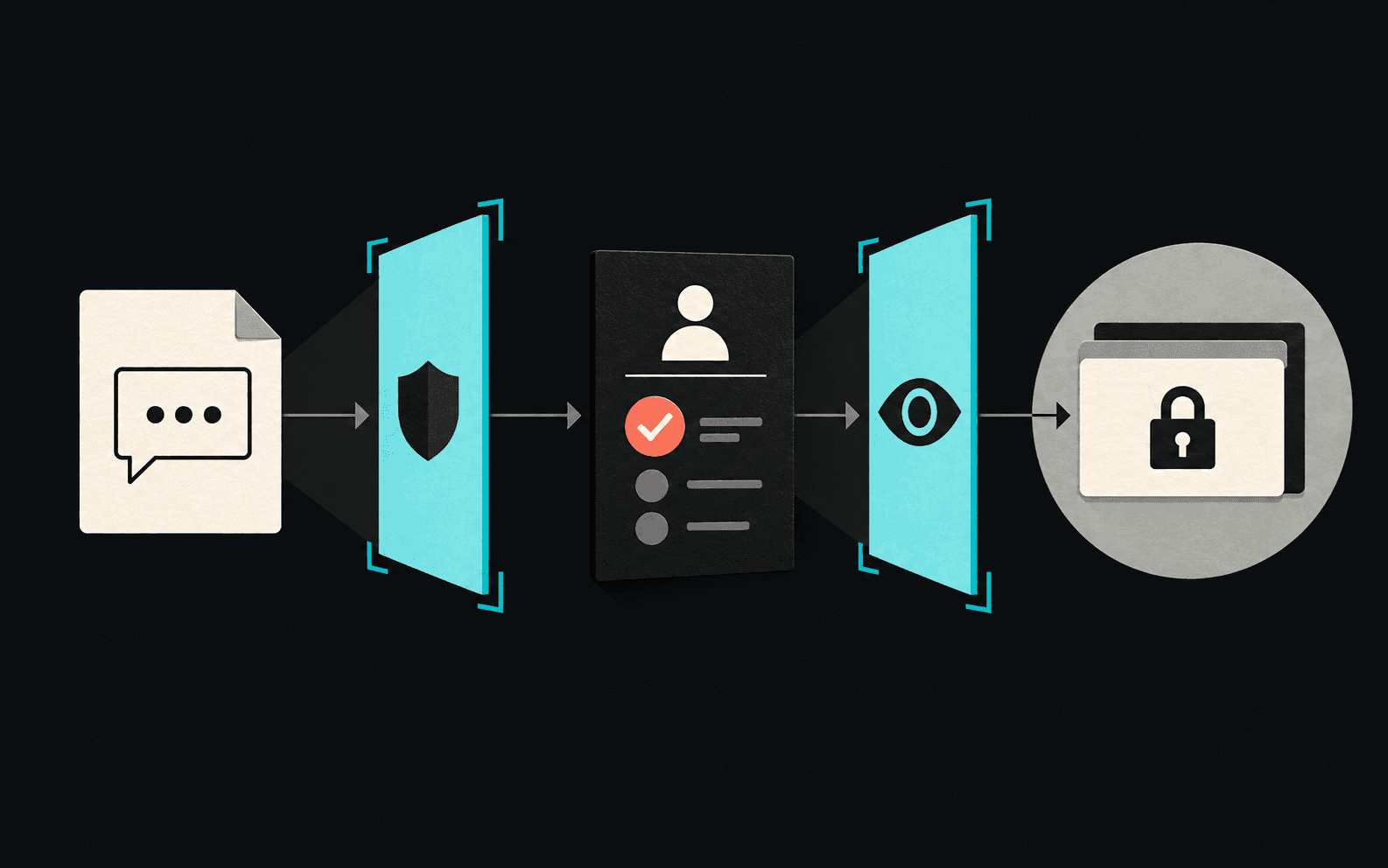
Combine restricted access, human approval, and monitoring around sensitive actions.
Scroll horizontally to read all columns.
Defensive controls
| Defense | What to do | Why it helps |
|---|---|---|
| Least privilege | Give AI tools only the files, accounts, repositories, inboxes, and APIs needed for the task. | An injected instruction cannot steal or alter what the assistant cannot reach. |
| Human approval | Require explicit review for payments, purchases, account changes, outbound messages, code execution, permission changes, and external data sharing. | It keeps malicious text from becoming an automatic action. |
| Action previews | Show the exact recipient, command, URL, file path, record change, and data payload before approval. | Approval works only when the reviewer can see the consequence. |
| Credential isolation | Do not expose secrets to general chat context. Use scoped service accounts, secret managers, short-lived tokens, and redaction. | It reduces the chance that a model can repeat, transform, or exfiltrate credentials. |
| Sandboxing | Run coding agents, package installs, document conversion, and web browsing in restricted environments with limited network and file access. | It limits machine takeover if the assistant follows malicious instructions. |
| Source labeling | Keep user instructions, system instructions, retrieved content, tool output, and untrusted documents clearly separated in the application architecture. | It helps policy checks and downstream tools understand what is trusted. |
| Allowlisted tools | Expose narrow, purpose-built actions instead of broad shell, browser, email, or admin access. | Narrow tools are easier to constrain, log, and review. |
| Monitoring | Log source documents, prompts, tool calls, approvals, and outbound requests with enough detail for incident review. | Investigators need to know what the assistant read and did. |
What academic research adds
Academic research shows how prompt injection can redirect AI agents and expose personal data, making it a systems problem. It appears when LLMs process untrusted content while connected to tools, private data, or external actions.
- Indirect injection can be remote. Greshake and co-authors described how attackers can place instructions in content likely to be retrieved by an LLM-integrated application, blurring the line between data and commands.
- Tool-using agents can be tested. Debenedetti and co-authors introduced AgentDojo, a benchmark with realistic tasks such as email, banking, travel, and workspace actions, to test whether agents can keep doing the user's task while resisting malicious instructions from external data.
- PII leakage has been shown in test settings. Alizadeh, Samei, Stetsenko, and Gilardi studied banking-agent scenarios and found that prompt injection can make tool-calling agents leak personal data observed during task execution, even when the agents often refuse to disclose passwords.
- Defenses need architecture, not just better wording. The CaMeL work argues for separating control flow from untrusted data and enforcing capability-based limits so retrieved content cannot freely steer tool use or leak private information.
Practical advice for individuals
- Do not paste secrets into general AI chats. That includes passwords, seed phrases, API keys, one-time codes, customer records, tax documents, medical data, and bank details.
- Verify links and downloads outside the AI answer. Open official sites yourself. Treat AI-provided package names, update links, and "security fixes" like any other untrusted recommendation.
- Do not let an assistant approve payments from an email summary. Confirm bank details using a known contact path, not the thread that requested the change.
- Read commands before running them. Be especially careful with one-line installers, shell pipes, encoded blobs, macros, browser extensions, and package post-install scripts.
- Use separate accounts for experiments. Test new AI tools with non-sensitive data and revoke access when you are done.
Practical advice for teams
- Classify AI workflows by consequence. A summarizer is lower risk than an agent that can send email, run code, change records, access customer data, or initiate payments.
- Write approval rules around outcomes. Require review for money movement, credential handling, account recovery, user permissions, data export, production changes, and external communications.
- Threat-model untrusted content. Include email, tickets, web pages, resumes, vendor documents, source code, dependency metadata, reviews, and social posts as potential instruction carriers.
- Red-team realistic scenarios. Use test accounts and fictional records to check whether an assistant will leak data, change a bank detail, execute a package command, or send a phishing link.
- Keep incident response simple. Know how to disable a connector, revoke tokens, rotate exposed secrets, preserve logs, and determine which records or messages the assistant accessed.
If you suspect an attack
Pause the affected workflow and preserve evidence before investigating what the assistant accessed or changed.
- Stop the workflow. Pause the assistant, connector, automation, or account action involved.
- Preserve evidence. Save the prompt, answer, source content, timestamps, tool calls, logs, approvals, links, attachments, package names, and commands.
- Revoke and rotate. Treat exposed API keys, passwords, OAuth grants, browser sessions, and recovery codes as compromised until reviewed.
- Check downstream actions. Look for sent emails, changed bank details, new rules, downloaded files, installed packages, permission changes, data exports, and unusual sign-ins.
- Notify the right people. Involve security, legal, privacy, finance, IT, and affected customers according to the data and systems involved.
Prompt injection questions
What is prompt injection?
Prompt injection is an instruction placed in content an AI assistant reads that tries to change the assistant's task or actions.
Can prompt injection arrive through ordinary business content?
Yes. Email, attachments, webpages, code comments, package descriptions, support tickets, social posts, and shared documents can all carry instructions an assistant may process.
What should a team do first?
Limit what the assistant can access, require a person to approve risky actions, verify links and payment details outside the assistant, and review tool logs.
References and source notes
Sources checked on 21 September 2026. Examples and defensive routines are editorial illustrations, not reported customer incidents.
- OWASP GenAI Security Project, LLM01: Prompt InjectionSecurity community reference for prompt injection in LLM applications.
- OWASP Cheat Sheet Series, LLM Prompt Injection PreventionLayered defenses, testing, monitoring, and implementation guidance.
- UK National Cyber Security Centre, Prompt injection is not SQL injectionGovernment cyber-security guidance explaining why application design must account for remaining prompt-injection risk.
- The Alan Turing Institute CETaS, Indirect Prompt InjectionResearch-institute discussion of indirect prompt injection as a security flaw in generative AI systems.
- Microsoft Security Response Center, indirect prompt injection defensesIndustry security guidance on defending against indirect prompt-injection attacks.
- Greshake et al., Not what you've signed up for: Compromising Real-World LLM-Integrated Applications with Indirect Prompt InjectionAcademic paper introducing indirect prompt injection against LLM-integrated applications and describing risks including data theft and tool manipulation.
- Debenedetti et al., AgentDojo: A Dynamic Environment to Evaluate Prompt Injection Attacks and Defenses for LLM AgentsAcademic benchmark for tool-using agents over untrusted data, including email, banking, travel, and workspace tasks.
- Alizadeh et al., Simple Prompt Injection Attacks Can Leak Personal Data Observed by LLM Agents During Task ExecutionAcademic study of prompt injection and personal-data exfiltration in tool-calling banking-agent scenarios.
- Debenedetti et al., Defeating Prompt Injections by DesignAcademic defense proposal using control-flow and data-flow separation plus capability limits.
Limitations
This article explains defensive patterns and research. It is not a report of a CiteSurge customer incident, a guarantee that any model setting eliminates prompt injection, or a promise of ranking, citation, or security outcomes.
AI visibility work still needs security judgment
CiteSurge runs fully managed enterprise AI visibility programs. Programs include GEO/AEO strategy, content recommendations and production, brand and source correction, agent readiness, and technical implementation. Buyer intelligence, AI answer testing, specialist engineering, and continuing measurement are part of the same program.
Our AI, marketing, brand, content, and engineering specialists work together around your company's brands, markets, and business priorities.
Emails, documents, web pages, and other outside content can inform an AI system, but they should never authorize it to expose data or change a company record. Our trust and methodology pages explain how we approach this work.
If you want to improve how AI systems find, understand, and cite your company without lowering your security standards, request a free GEO audit.
References
- LLM01: Prompt Injection · OWASP GenAI Security Project · reviewed
- LLM Prompt Injection Prevention Cheat Sheet · OWASP Cheat Sheet Series · reviewed
- Prompt injection is not SQL injection · UK National Cyber Security Centre · reviewed
- Indirect Prompt Injection: Generative AI's Greatest Security Flaw · The Alan Turing Institute CETaS · reviewed
- How Microsoft defends against indirect prompt injection attacks · Microsoft Security Response Center · reviewed
- Not what you've signed up for: Compromising Real-World LLM-Integrated Applications with Indirect Prompt Injection · arXiv · reviewed
- AgentDojo: A Dynamic Environment to Evaluate Prompt Injection Attacks and Defenses for LLM Agents · arXiv · reviewed
- Simple Prompt Injection Attacks Can Leak Personal Data Observed by LLM Agents During Task Execution · arXiv · reviewed
- Defeating Prompt Injections by Design · arXiv · reviewed