Start your first measurement
Set your brand, markets, and buyer prompts, then use your first audit to choose what to improve.
Open in dashboard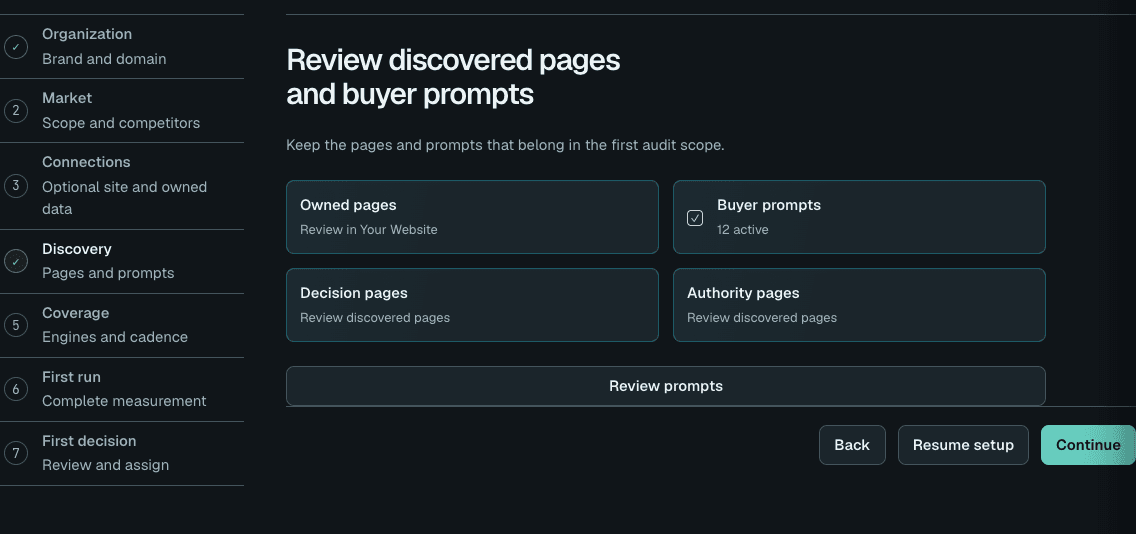
Steps
Confirm the project and brand
Open Workspace setup from the project sidebar. In Organization, confirm the project name and primary domain. Then open Brand facts and save a brief for each active brand. Describe what you sell, who you serve, and the names buyers use for your business.
Open Project setupChoose markets and competitors
In Markets & measurement, review the saved country and language pairs you want to measure. Check the competitors you want to compare with in the same market. A useful roster includes businesses a buyer might genuinely choose instead.
Open MarketsAdd and activate buyer prompts
Open What Buyers Ask AI → Prompt library. Select Add prompt, or use Import with one prompt per line. Choose a saved prompt language and review the engine and market targeting. Select saved prompts and choose Approve to activate them. Every active brand needs at least one active prompt for setup.
Open Prompt libraryReview pages and optional connections
In Workspace setup, use Discovery to review prompts, and open Your Website to review the pages in scope. Connections is optional and lets you add sources such as website analytics or Search Console when offered. Check that any selected property belongs to this project.
Open Project setupReview coverage and schedule the first audit
CiteSurge measures across 9 AI engines. Coverage in Workspace setup shows which engines your project includes. Under Reports → History, check the next measurement. If Edit measurement is available, choose a cadence and select Save schedule. Then check First run in Workspace setup or return to Overview to follow progress.
Open Measurement scheduleCheck the first run
Open First run in Workspace setup to see whether the audit is pending or complete. If setup still asks for prompts, return to Prompt library and check their activation. Once the audit is complete, open the published record in Reports.
Open Project setupReview the published audit
Open Reports → Library and select the published audit by date. Read Executive for the main finding and AI Visibility Score, then open Details for the pages and evidence behind it. Use Methodology to confirm what the audit measured.
Open Report libraryStart one improvement and check the next result
In Action Plan, open an item you can act on and read Why this matters, Evidence, and Next steps. Share the work with the person who can make the change. Update the item's Status if you have edit access and use a later audit to review the same finding.
Open Action Plan worklist